Refero: the reference library built for your AI, not your mood board
125,000 real screens, and a file format — DESIGN.md — made to hand an AI agent constraints instead of vibes. Here's how to use it, and how to do the same trick on any site you already love.

01 — What it is
What is Refero, and why is it different from Pinterest?
Refero is a design research platform: 125,000+ real product screens, user flows and UI patterns pulled from 400-plus best-in-class web and iOS products. On the surface it looks like any other inspiration library. The difference is what happens when you leave it.
You save 30 screenshots that "feel right." An AI looking at the board has to guess why — is it the spacing, the font, the color, the photography?
You get a written breakdown of the same reference: exact palette, type scale, spacing rhythm, component patterns. An AI reads constraints, not vibes.
Refero even ships a whole doc set at styles.refero.design/ai-agents/ — design resources, DESIGN.md examples, design prompts — aimed specifically at people prompting AI, not people scrolling for inspiration.
02 — Inside a DESIGN.md
What exactly does a DESIGN.md file contain?
A real design reference gives an AI constraints it can apply: type scale, spacing rhythm, palette, component framing, page density. That's the whole list — four or five concrete axes, not an adjective like "clean" or "modern."
Palette: primary #0B0B0C, accent #DC308F, background #F5F5F2
Type scale: 14/16/20/32/48px, headings at 32-48, body at 16
Spacing rhythm: 8px base unit, sections at 64-96px vertical gap
Components: cards with 1px hairline border, no shadow, 4px radius
Density: generous whitespace, ~70% empty space per screen,
  one focal element per section
Every one of those lines is something you can paste into a prompt and get checked against — the same way a developer checks code against a spec, not against a feeling.
03 — Searching 125k screens
How do you actually search 125,000 screens for the right reference?
The number is only useful if you can narrow it fast. Search by product category and by the specific flow you're trying to reference — "pricing page," "onboarding," "empty state" — rather than browsing by vibe. Refero's screens are organized by real product and by UI pattern, so "show me pricing pages from B2B SaaS products" is a real, answerable query, not a hope.
1. Category: what kind of product is closest to yours? (B2B SaaS,
   consumer app, marketplace, content site)
2. Flow: what specific screen do you need? (pricing, onboarding,
   settings, empty state, checkout)
3. Constraint: one thing you already know you want (dark mode,
   dense data table, minimal — pick one, not a wishlist)
Three narrow answers beat one broad scroll through 125,000 screens.
04 — Do it yourself
How do you turn ANY site you like into a prompt, not just Refero's library?
You don't need Refero's library to use Refero's trick. The extraction is a prompt pattern you can run on any site, screenshot, or competitor page you already admire — hand the constraints to your AI instead of the picture alone.
That last line — keeping one thing of your own — is what stops the output from becoming a copy of the reference instead of a version of your own brand that borrows its structure.
05 — Refero vs. the rest
Refero vs. Mobbin vs. Godly — which for which job?
These aren't competitors so much as different tools for different moments in the same brief.
"What does a real product's ENTIRE flow look like, screen by
  screen?" → Mobbin — full-flow mobile captures by app and industry
"What's a well-made site look like RIGHT NOW, editorially
  curated?" → Godly — 2-3 sites a week, restrained over flashy
"What does a landing page in MY industry look like?" → Land-book
  — searchable by industry and page type
"What are the exact PALETTE and TYPE SCALE numbers behind this?"
  → Refero — the only one of the four built to output that as text
In practice: browse Mobbin, Godly or Land-book to find the reference you like, then run the DESIGN.md extraction from section 04 on whatever you land on — you don't need all four libraries, you need the one extraction habit.
06 — The screenshot trap
Why does just pasting a screenshot into AI usually fail?
Pasting a screenshot and typing "make something like this" isn't nothing — ChatGPT Images 2.5, released September 8, 2026, specifically improved its handling of reference images, and image models do read pixels better than they used to. But a picture still leaves the model guessing which parts of it mattered to you.
"Make something like this" → the model has to guess: was it the color? The spacing? The photography style? It picks one and you're often wrong together.
"Here's the reference. Extract the palette, type scale and spacing as numbers first, then build with those" → no guessing left — the model checks its own output against the numbers you named.
07 — Start here
What do you do with this on your very next brief?
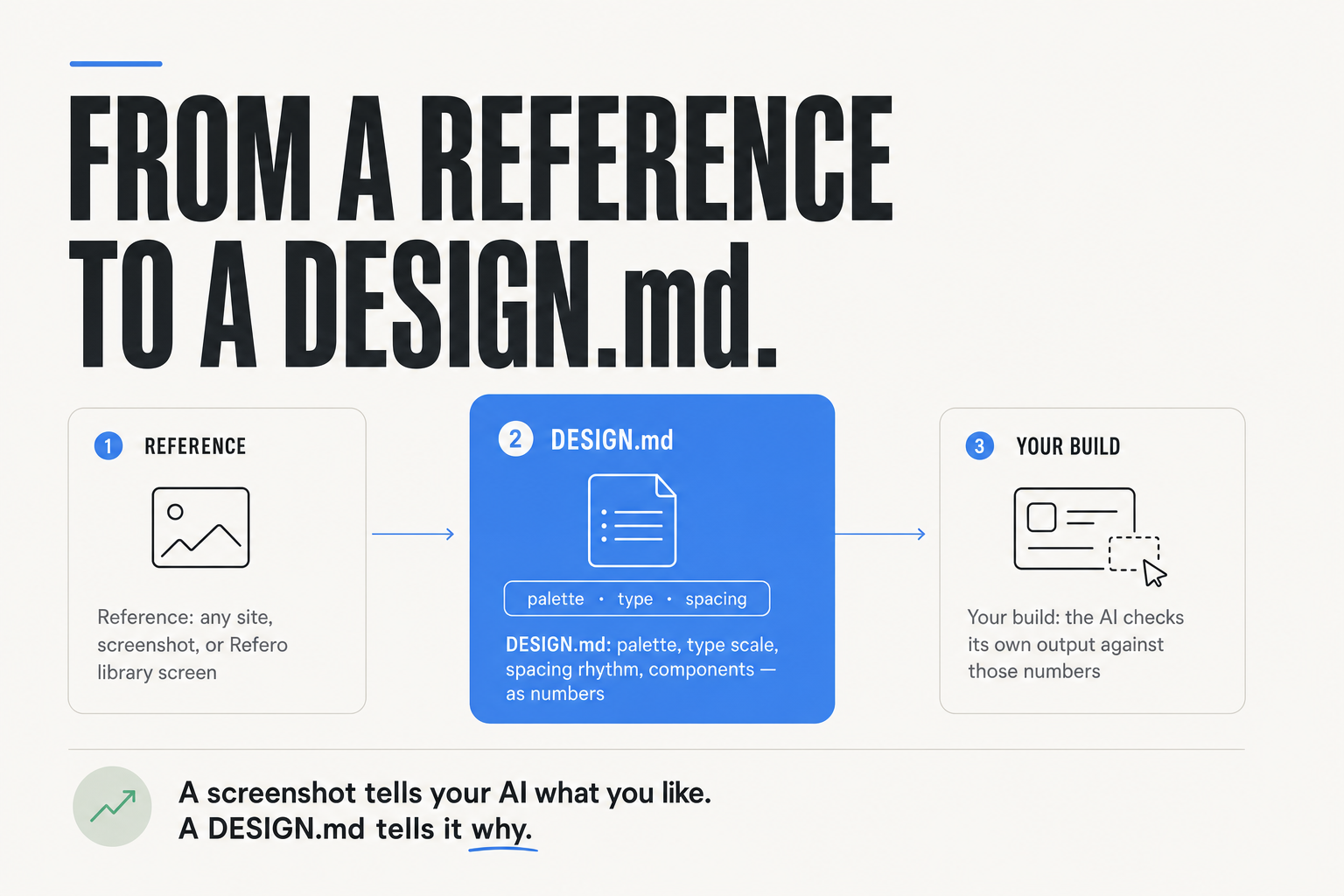
Pick one thing you're about to design — a carousel, a slide, a landing section — and one reference you already like. Run the extraction prompt from section 04 before you ask for the thing itself. That single extra step is the whole difference this article is arguing for.
Old habit: "Make me a [thing] like [reference]."
New habit: "Extract palette, type scale, spacing and components
from [reference] as a DESIGN.md-style list first. Then build
[thing] from that list, keeping [my one brand element]."A screenshot tells your AI what you like. A DESIGN.md tells it why — in numbers it can actually check itself against. This is exactly the mechanic behind Teach Claude Your Style: a free twenty-minute walkthrough that turns one reference into a standing brand instruction, so you extract it once instead of re-explaining your style in every prompt.
FAQ
What is Refero and how is it different from Pinterest or Dribbble?
Refero is a design research platform with 125,000+ real product screens from 400+ apps. Unlike a mood board, it extracts a DESIGN.md file from any reference — exact palette, type scale, spacing rhythm and component patterns — written to be read by an AI as constraints, not admired by a human as inspiration.
What's actually inside a DESIGN.md file?
Four or five concrete axes: palette (hex codes), type scale (exact sizes), spacing rhythm (base unit and gaps), component patterns (borders, radius, shadows), and overall density. It's numbers you can paste into a prompt and check output against, not adjectives like "clean" or "modern."
Do I need Refero's library to do this myself?
No. The extraction is a prompt pattern, not a Refero-exclusive feature — run it on any site, competitor page or screenshot you already like. Ask your AI to extract palette, type scale, spacing and component patterns as numbers before asking it to build anything.
Why isn't pasting a screenshot into ChatGPT or Claude enough?
A screenshot alone leaves the model guessing which part of it you actually meant — the color, the spacing, the photography. Even with September 2026's improved reference-image handling in tools like ChatGPT Images 2.5, pairing the image with an explicit palette/type-scale/spacing breakdown removes the guesswork entirely.