ChatGPT Work is here: what to set up on day one to get an agent, not a chat
A 30–40 minute setup plan: connectors, a knowledge base, Scheduled Tasks and skills — plus a downloadable checklist of what to feed your agent so it speaks in your voice.

01 — What happened
What is ChatGPT Work and why does it feel like “finally”?
ChatGPT Work came out today. And honestly, my first thought wasn't “oh, a new product.” My first thought was — “finally.”
Because at its core these are the agentic capabilities Claude has had for a while: access to your computer, work with external services, multi-step tasks that don't need you at every step. The magic existed — but very few people could actually reach it. The entry barrier was high, and I keep hearing the same story: “I set it all up, and a week later my account got blocked.” For someone who wants to work rather than administrate access, that was too fragile.
Claude had them: computer, services, multi-step autonomy. But the setup was for technical people, and the stories around were about blocked accounts. In practice, only a handful used it.
A similar mechanic — inside the tool millions of people already use every day. The entry cost is not “figure it out and take the risk” but 30–40 minutes of calm setup.
That's the real news — not “a new feature shipped,” but “agentic mechanics arrived where your work already lives.” Here's what to do with it on day one.
02 — The trap
Why won't “just open it and type a task” work?
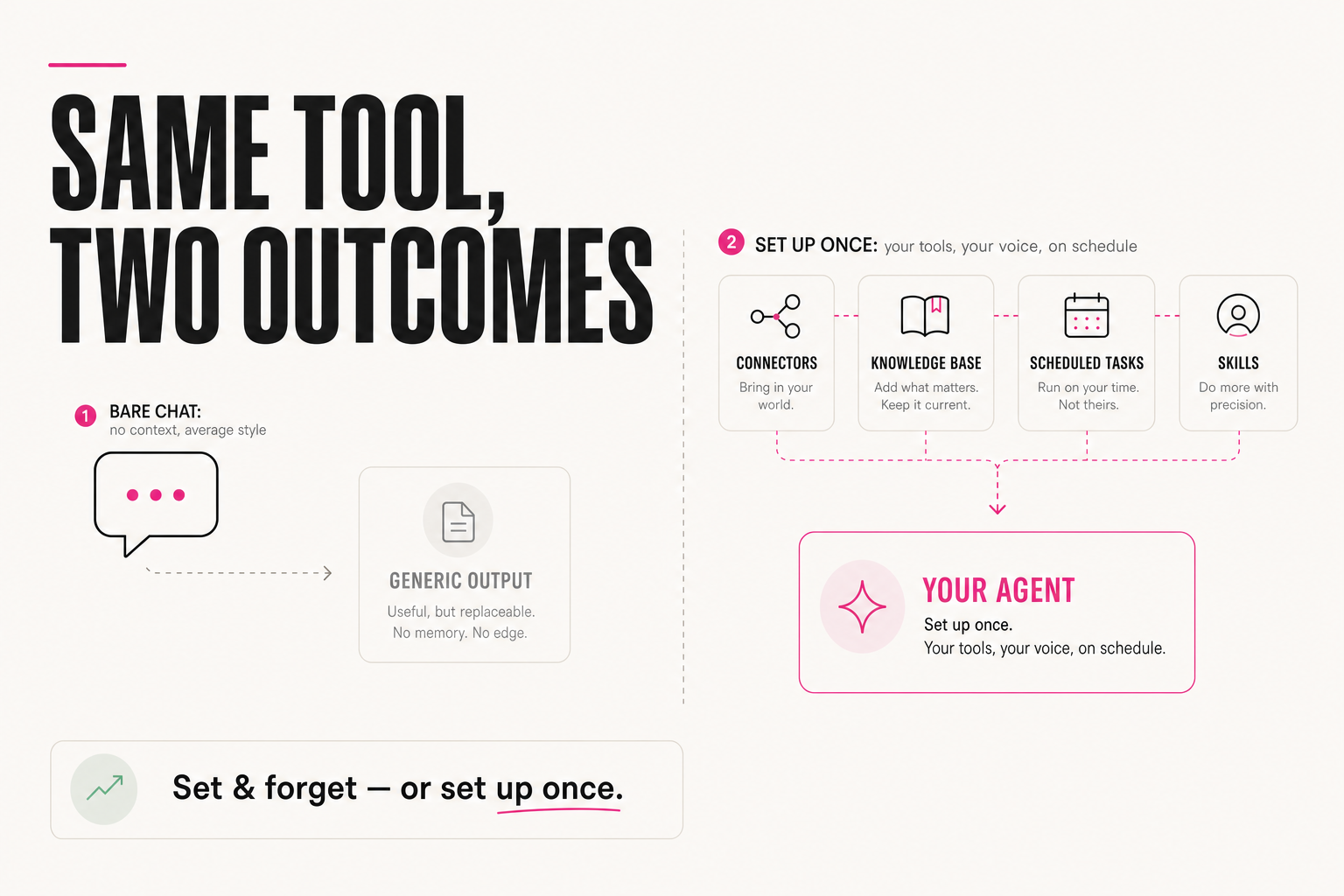
Here's the catch. Opening ChatGPT Work and typing one task into it is not the same as configuring an agent that actually works for you every day. The same tool can be installed and forgotten. Or it can be set up once — and become an assistant that knows your context, remembers your tasks and is connected to your real instruments.
Every task is a new empty chat. The agent doesn't know who you are, what you sell or how you sound — so it writes in “average AI style.” You carry the data by hand: copy, paste, move it back.
The agent sees your calendar and files, answers from your materials in your voice, runs recurring work on schedule — and you review finished results instead of explaining everything from scratch.
The difference isn't the tool — it's 30–40 minutes of setup. Below are the four day-one steps in order; the knowledge-base step comes with a checklist you can download and tick off.
03 — Step 1
Which connectors should you plug in on day one?
Start with external services: Google Calendar, computer access, Figma, spreadsheet creation and editing, email. Without them the agent is just a chat you copy-paste into by hand. With them it's already an assistant that sees your day, opens files itself and can move things inside them without you.
Don't connect everything — connect the services where your real tasks live: if your day is built around meetings, calendar and email go first; if it's built around content and mockups — files, spreadsheets and Figma. Then immediately test the wiring on live tasks:
1. “Look at my calendar for tomorrow and build a brief:
who I'm meeting and what to prepare for each”

2. “Open the content-plan spreadsheet and flag
the posts that have no deadline”

3. “Collect client emails from this week and summarize:
questions, agreements, what needs a reply”
If all three tasks ran without manual copy-paste, your connectors are set up right. If somewhere you had to move data by hand — that's the missing connector. Add it now, while you remember where the bottleneck was.
04 — Step 2
What goes into the knowledge base so the agent speaks in your voice?
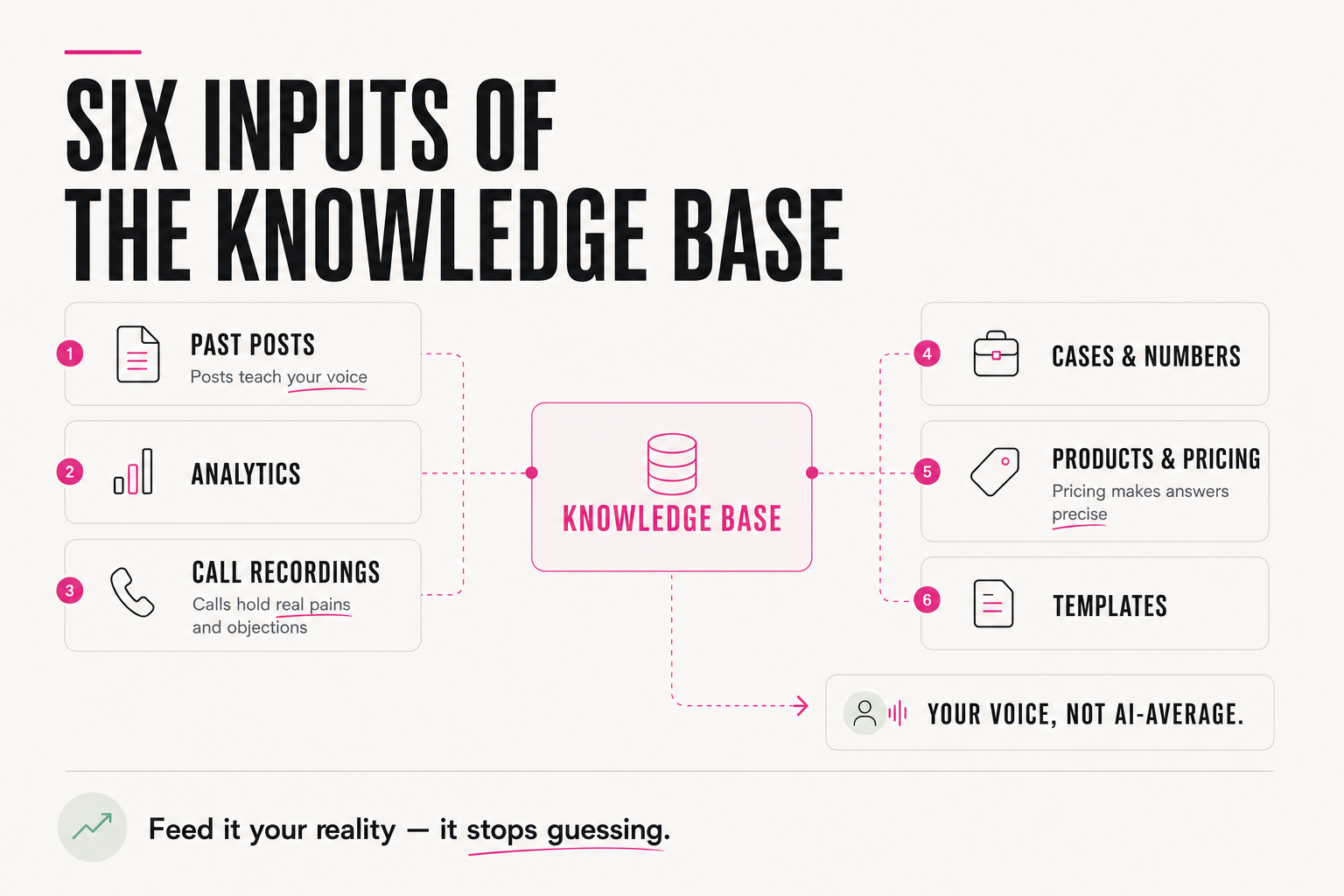
And this is the most important part. Most people stop at connectors — and then wonder why the agent writes smoothly but “not about them”: average tone, generic advice, invented details. The reason is simple: the agent has never seen a single one of your materials. Give it access to your existing knowledge base — or build one from scratch if you don't have it yet.
What's actually worth putting in, point by point:
- All the posts and content you've ever published — that's how the agent learns your voice instead of writing in “average AI style”
- Social media analytics — what took off, what didn't, and why
- Recordings of client calls — real pains, real phrasing, real objections
- Finished case studies, testimonials, result numbers — the raw material of every offer and every proof
- Descriptions of your products and services, pricing, terms — so the agent answers precisely instead of inventing
- Templates and methodologies you already use to solve tasks
Call recordings deserve a special mention — they are pure gold. In them, clients name their pains in the exact words you should later sell with. No brief will ever give you sharper phrasing.
Without a base, the agent works blind and reinvents your context every time. With one, it understands from the first message who you are, what you sell and how you speak. It's the same principle I unpacked in the article on context: the prompt is only 25% of the result.
05 — Step 3
How do you use Scheduled Tasks for recurring work?
If something happens every day or every week — a morning brief, a task review, a metrics digest — don't keep doing it by hand again and again. Scheduled Tasks is literally the block built for this: you describe the task and the schedule once, and the agent runs it on its own and delivers the finished result.
Every weekday at 8:30:
1) check my calendar for today — meetings
   and what to prepare for each;
2) collect everything from email that needs a reply today;
3) remind me of the three top priorities from my task list;
4) put it all into one message — no longer than one screen.
The selection rule is simple: the task repeats at least once a week and the output format is the same every time — then it belongs in Scheduled Tasks. Start with one, the most tiresome. Once you get used to receiving it ready-made, add the rest: a weekly metrics digest, a Friday task review, a content-plan reminder.
06 — Step 4
Why turn your prompts into skills — and how does it all fit into 30–40 minutes?
The last step: turn your prompts into skills. Don't keep them in notes you have to copy from manually for every task. A skill is an instruction the agent applies by itself: it understands which prompt is needed and when — without you re-explaining what you meant every single time.
SKILL: “post for my channel”
WHEN TO APPLY: I ask for a post, announcement or teaser
CONTEXT: my voice — from the knowledge base (past posts),
  3 examples of posts with the best reactions
CRITERIA: one idea per post, specifics over generalities,
  no corporate filler and no “average” intros
OUTPUT: finished text + 2 options for the first line
Converting 2–3 prompts you copy most often is enough — the rest you'll add as you work. For a deeper look at why skills beat one “giant prompt,” see the article on how an agent differs from a chat.
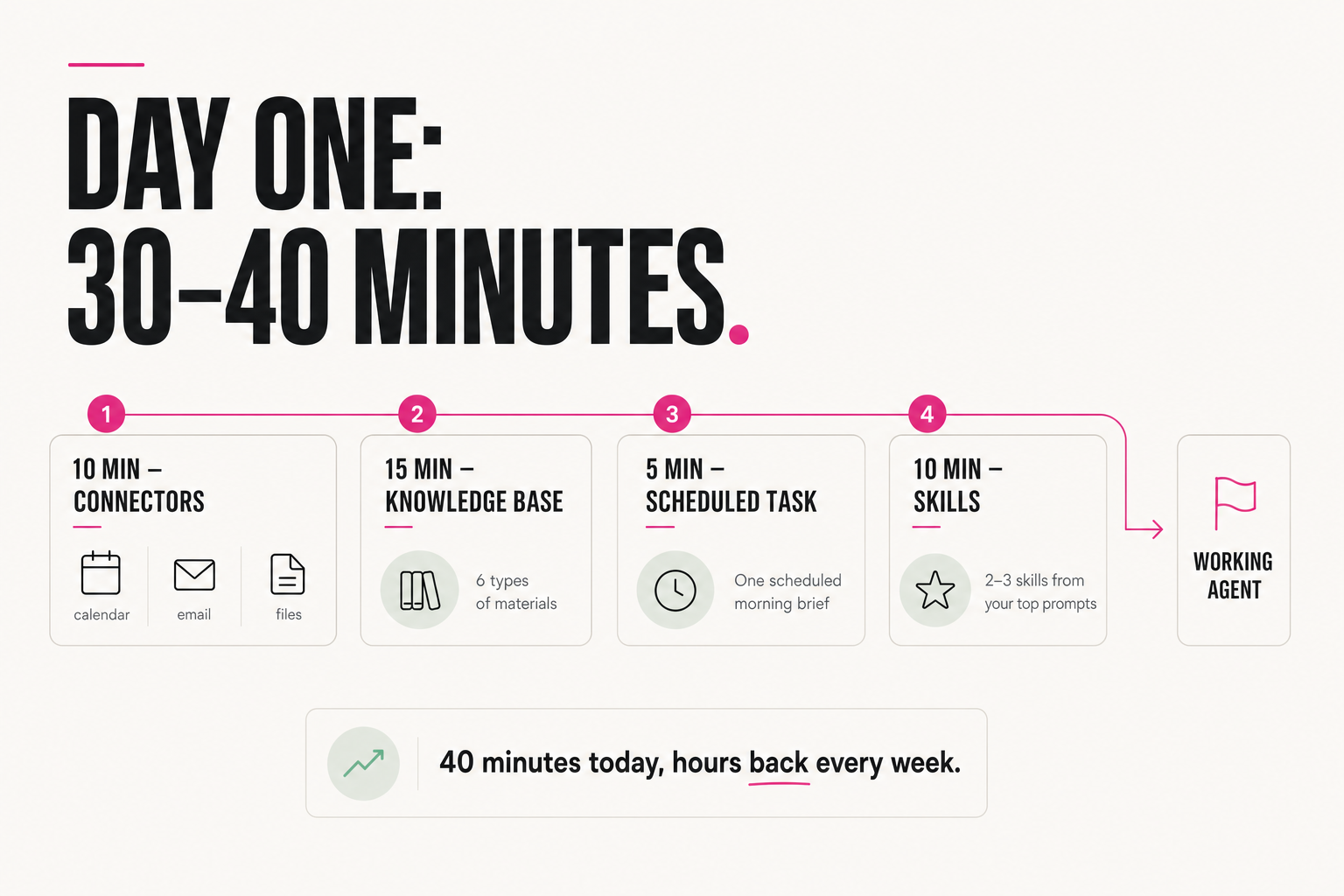
Now let's assemble the whole day-one plan:
~10 min — connectors: calendar, email, spreadsheets
          (+ Figma and computer access if you need them)
~15 min — knowledge base: the 6 types of materials
          from the checklist above
 ~5 min — one Scheduled Task: the morning brief
~10 min — 2–3 skills from the prompts you copy most often30–40 minutes — and you don't have a chat, you have a pre-configured system: the agent sees your tools, answers from your materials in your voice, and runs recurring work on schedule. From then on it keeps simplifying and automating your work every day — and you review finished results instead of starting from zero.
FAQ
How is ChatGPT Work different from regular ChatGPT?
By its agentic capabilities: access to your computer and external services (calendar, email, spreadsheets, Figma), multi-step tasks that don't need you at every step, Scheduled Tasks for recurring work, and skills. Claude has had similar mechanics for a while, but the entry barrier was much higher — now it's inside the tool millions use daily.
What should go into the agent's knowledge base first?
Three things give the fastest effect: your past posts and content (the agent learns your voice), recordings of client calls (real pains, phrasing and objections — pure gold), and your product descriptions with pricing and terms (the agent answers precisely instead of inventing). Then add social analytics, case studies with numbers, and your templates.
How long does the ChatGPT Work setup take?
About 30–40 minutes for the base setup: roughly 10 minutes for connectors, 15 for the knowledge base, 5 for the first Scheduled Task and 10 to convert your 2–3 most-used prompts into skills. After that the system grows as you work.
Do I need to know how to code to set up an agent in ChatGPT Work?
No. All four steps — plugging in connectors, loading materials into the knowledge base, creating a Scheduled Task and writing skills — are done without code. The key resource isn't technical skill but your materials: content, call recordings, case studies, pricing.